Showing posts with label Ubuntu. Show all posts

Friday, June 13, 2008

Ubuntu Tip of The Week: Changing the Login Message on Ubuntu Server

Hey boys and girls out in Admin land! I thought I would swing by aTa today to drop a little Ubuntu know-how on ya.

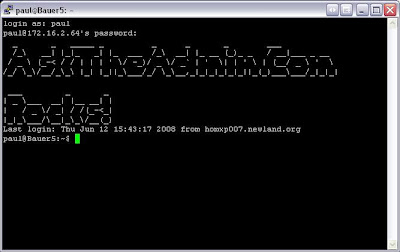
Have you installed Ubuntu server and noticed that when you login to it there is the generic CYA login message from Ubuntu about them not providing warranty blah blah blah blah? Of course you have! Personally, I am not one to stick to defaults very often, especially when it comes to generic welcome messages that can be easily changed! Here is what the original message looks like:


Linux Hostname 2.6.24-18-generic #1 SMP Wed May 28 20:27:26 UTC 2008 i686

The programs included with the Ubuntu system are free software;
the exact distribution terms for each program are described in the
individual files in /usr/share/doc/*/copyright.

Ubuntu comes with ABSOLUTELY NO WARRANTY, to the extent permitted by
applicable law.

To access official Ubuntu documentation, please visit:
http://help.ubuntu.com/
Yuck! How boring is that? Why not change it to something a little more fun? Or perhaps, if this is a company Ubuntu server, maybe something a little more customized for your company? Changing the message is really quite simple. Just run the following from the terminal:

sudo nano /etc/motd

Make your changes, and save them. It really couldn't be any easier than that. Now you might have something that looks like this:


For those not in-the-know, motd stands for "Message of The Day" which according to Wikipedia is used to:

...display rules, administrator contact, or simply a piece of ASCII art. This is frequently used in schools or workplaces such as offices.

Have you created a funny or strange motd message on your Linux box? Care to share a screen shot? If you have some good ones, please post a link to them in the comments.

[EDIT]- By The way, if you don't want your new cool message changed back at reboot, you will also have to edit /etc/motd.tail as well. And yes Jeremy, you can use vi instead of nano!

By El Di Pablo of Bauer-Power

Thursday, May 15, 2008

Ubuntu Tip of The Week: Configuring Static IP Addressing

Hello fellow geeks and geekette's! It is I, El Di Pablo back with another quick Ubuntu tip. I thought of this because I am working on creating an Ubuntu 8.04 VMWare GSX server for my company. I figured I might as well write about it on aTa while it is still fresh in my mind.

As with most servers, you want to configure it for static IP addressing to make life a little more simple for everybody. Linux servers are no exception. The only trouble with some flavors of Linux servers is that they are strictly command line for less overhead and better performance. So how does one configure Ubuntu server for static IP addressing in the terminal you ask? Simple:

  1. First you need to edit /etc/network/interfaces using your favorite text editor (I like nano):

    sudo nano /etc/network/interfaces

  2. Next you need to enter your static IP information:

    #The primary network interface
    auto eth0
    iface eth0 inet static
    address 192.168.0.100
    netmask 255.255.255.0
    network 192.168.0.0
    broadcast 192.168.0.255
    gateway 192.168.0.1

  3. Save your changes.
  4. Now you need to point your server to your DNS server. To do this, you need to edit /etc/resolv.conf:

    sudo nano /etc/resolv.conf

    name server xxx.xxx.xxx.xxx (Replace the x's with the IP address of your DNS server)

  5. Save your changes, then restart your network:

    sudo /etc/init.d/networking restart

  6. Now test it by pinging www.asktheadmin.com. If all went well, you should be all set!


Have you had to set up a production Ubuntu server in your environment? Tell us about your experience in the comments!

By: El Di Pablo of Bauer-Power

Thursday, May 01, 2008

Ubuntu Quick Tip: Missing Minimize and Maximize Window Buttons?

Ubuntu gnome ask the adminHello out there in admin land!

It is I, El Di Pablo here to bring you a quick Ubuntu tip for the week. I haven't written on aTa in a while due to my hectic schedule, but I am sure you have seen me milling about the comments quite a bit.

Anyhoo, so there I am last night, screwing around on my Ubuntu laptop surfing porn doing homework when I noticed that all of my minimize and maximize buttons were missing from my windows. The only way to minimize and maximize my windows were to right click on the bottom task bar and select it from the menu. WTF?!?!?

Well, it turns out that those buttons aren't completely controlled by Gnome. For those buttons, Gnome uses a windows manager call Metacity. To get those buttons back I had to open a terminal and run the following command:

metacity --replace

Once I did that, my buttons came back, and I was able to minimize and maximize like a mofo! Do you have any good Ubuntu tips/tricks you want to share? Hit us up in the comments!

By El Di Pablo of Bauer-Power

Saturday, November 03, 2007

Honey, We are a Ubuntu Household Now.

Flash Back Two Months Ago...

This is my first post as an Ubuntu user
. Let me give you the story how I kicked my Microsoft addiction. Well actually my computers had an intervention!

The Admin has been through computer hell these last few days. First my Dell Latitude X1 refuses to charge... So I have been trying to be savvy and save my 7 hour battery just for emergencies. This is not for the faint of heart!

After troubleshooting galore I have come to the conclusion that it's the power module on the motherboard of that mother clucker. Dell does not sell that module - but they say it should just be re-soldered. but they won't tell you to do it...Nor will they tell you how to do it with a small soldering gun...

The dude continued to tell me that I was probably better off getting a new machine. That caused me to inquire into the price of the board. He said he couldn't be sure but with installation it would be in the area of a G bone...Without the processor!!! I didn't pay a thousand bucks for the whole thing (I love eBay)!

I found a spot downtown, near my office, that says they can fix it for me for $250. We'll see about that! Then to top it off my desktop hard drive just up and died on me. I was down to running strictly off my Dopod. Which wasn't as bad as I thought it was going to be! But we will save that for the Dopod review this weekend. (I promise... Stop the emails... No Wait We Like Them... Keep The Emails Coming!).

I was so fed up I just pulled the hard drive out connected via a IDE to USB joint and popped an UBUNTU CD into the drive. I pushed a 4gb memory stick in that bitch and called it a day. Out of the box all I needed to do was activate the network and that's it. I was off Ubuntuing around. Firefox, Gimp, MSTSC... I was golden. I haven't found anything that I can't do in Ubuntu yet - built in Bit Torrent client, CD/DVD burning tools and a repository with a shit-load of other crap you don't need but will probably download anyway!

Then I went to try and explain this to the wife :)...

Honey, We use UBUNTU now... Its the same but different...

So thats it all I have to say is "go to hell you cold unforgiving Windows..." @ least until we demo Windows Server 2008 this weekend!

_TheUbuntuAdmiN_

Anyone got any tips for an Ubuntu n00b??...

Two months later still loving Ubuntu - Actually upgraded to the Gutsy Gibson AND my buddy helped me resolder my X1. So far so good. Any other converts out there?

Monday, October 29, 2007

Last night Ubuntu saved my life - How I used Ubuntu to recover ALL my files...

Hello Boys and Girls,

Commodore 64 here to bring you another horror story from binary-land. Lord knows I've been through hell and back with computers. Overheating CPUs, which were fixed by the cold of the winter outside my apt; crashing hard drives which were fixed or accessed by various means; faulty power supplies, which had me gutting and re-assembling my machine; and many more.

Up to this point, the only time I actually lost data, was to my ex-wife, who got to keep the computer with all my stuff in it, while I made away with a crappy laptop. Other than that, I've always been able to salvage my data somehow.
This time I had a new problem. Upon conferring with the Admin, to whom I have exclusive access (belonging has perks people, hit the comments if YOU want to belong as well) we came to the conclusion, based on past problems that were brought to his attention, that I have a power supply which is not supplying a steady stream of power to my hard-drives and various other internally powered devices. Now so far, to the best of my knowledge, a hard drive and ram are really the only components that can suffer from a faltering power supply. For the past 6 months, my computer has eaten through 3 Western Digital hard drives, which I'm sure were perfectly fine from the get-go. I will note here that I DO NOT blame Western Digital for these issues. I am a fair consumer which doesn't point unnecessary blame where it is not due. I will however give them a call and will update this blog with their responses and whether they are able to help me at all along the lines of some replacements.

My problem started because of me. I let waaaay to much time go by before I blew the inordinate amount of dust out of my computer, and more importantly, my power supply. I have gotten into the bad habit of leaving my case open, as I am also inordinately lazy. This probably contributed to the systematic weakening of my power supply. My hypothesis is that the dust caked up on the power supply fan, causing the power supply to rise in temperature, and over time this started to affect it's power output. This, in turn, caused my hard drives to fuzz in a very weird, intermittent way. At first we thought that my snazzy hard drive enclosure was the culprit. I had one of my drives, my all-important work drive with all my years of work, in an enclosure which, through an lcd display provided me spin-up and temperature info, but more importantly this enclosure allowed my drive to be cold-removed from my machine easily. My justification was, that in the case of a fire, or a world-wide Huxley style pron hunt, I would have the ability to simply slide my drive out of my machine, and make off with my all-important stuff. Karl and I had hypothesized earlier on, that this was the culprit to the failing of my first WD-320 drive. At the time this was my data drive on which I kept all my data, but I also had a recent copy of the data on another drive, so it was no big deal.

So I removed the offending enclosure and drive, and continued on with a slightly bruised ego and one less hard drive in my collection. For about a few months this was fine. Most likely there was now less power being drained from the power supply so this proved to be a stop-gap measure which lasted only a few months, which I only know now.

Then the unthinkable happened. Something that hasn't happened to me in years. A full-out dead freeze in Windows, which upon rebooting, no longer existed according to the cryptic error message my BIOS was giving me. Windows was gone. Since I couldn't deal with the problem right there and then, I popped in my newly burned Ubuntu 7.10 Live CD to leave some semblance of a usable computer intact on my PC.

A few days later I was actually able to spend some time recovering or repairing my machine, whichever came first. Since I had turned the machine off the night before, I booted up and noticed that Windows was beginning to boot. Hooray!
By some miraculous feat, Windows was booting up! However, my beloved work drive was not showing up. Upon checking BIOS I noticed that the hard drive was being detected, but Windows couldn't see it! Before I could do much else, Windows froze again. At this point I realized Windows wasn't coming back, and that I had to concentrate my efforts on damage control rather than repair. Recovering my work files became my top priority.

Enter Ubuntu.

At first, Ubuntu did not recognize my work drive. Then, after a few minutes, my work drive appeared in the My-Computer-esque Home window Ubuntu had given me. Eureka! The OS sees my drive. I quickly connected my LaCie external USB drive and double clicked on the WD-320 drive which contained all my precious work files. One more obstacle: I received an error which said something to the effect of (loosely translated) "Ubuntu needs you to give it the command, in the command prompt, to mount the drive with the force option activated." I popped open Firefox and Googled just the first part of the error and was presented with some results to some blogs which contained the exact command, with switches, that I was to use to successfully get my drive accessible in Ubuntu. The command worked an I proceeded to copy the 130 Gigabytes of precious data from my half-broken, limping hard-drive to my ever solid external USB drive. A few hours later the operation was complete. I can rest easy now.

A later memory test, courtesy of the good people that brought the Ubuntu Live CD, revealed that my memory chips were fried too - looks like a job for Crucial.com.
It's been a week now, and thanks to Ubuntu, getting my data accessible after a hard system crash like that was not something I had to lose sleep over. Since I was able to safely offload my data without having to overhaul my computer, I was able to get some sleep that night, and many other nights following the incident. Sleeping is not an issue when you know your data is safe, even if for the time being.

Now I can slowly work on getting the $500 together to buy 2 new hard drives, and 2 new ram chips, so that one day my computer will be restored to it's former dual-screen, design station ala Commodore glory. But in the meantime, I can survive rather comfortably using my Mac, and my resuscitated PC running Ubuntu 7.10. In all fairness this was a harrowing situation, but the availability of a self-contained, graphical operating system, that can run off a CD on a PC with nothing in working order besides a power supply, a motherboard, and some limping hard drives and memory chips, enabled me to not have to put my life on hold again to ensure access to my important stuff.
Piece of mind, that's what it came down to.

_TheSleepingCommodore_

Saturday, October 20, 2007

What a Dream Come True! DreamLinux that is!

I mentioned in a recent post that I recently aquired an older Pentium III laptop with only 384MB of RAM. It really isn't fast enough to run Windows XP without trimming the fat.I originally was going to put Xubuntu on it, because Xubuntu is designed to be more light weight than regular Ubuntu, because it uses the more minimal XFCE interface. It turns out though that XFCE is still a little too beefy for even this computer. Sure it installed, and ran fine, just a little slower than I would like. I did try XP with the fat trimmed like I mentioned above, but that was still God awfully slow.

Not wanting to give up, or revert to an older version of Windows, I decided to keep poking around in the Linux world for a solution. There are a lot of them out there that will run just find on such a machine, but the trick it so get one that my wife won't mind using when going to the Java Mama's coffee shop with my little girl.

II found the perfect distro for my wife in Dream Linux! This is one of the many lightweight live CD distros out there that also have the ability to install to hard drive. The cool thing about Dream Linux that I like, and my wife likes especially since the popularity of MAC's now days (Damn they have good marketing don't they?) is that this is pretty much a MAC clone complete with the animated launcher bar at the bottom, and yes, that bar works well on the Pentium III without slowing it down!

If you have a relatively newer computer, it also supports Berly and AIGLX, which means sweet 3D desktop goodness!


Of course, I wouldn't even try using Berly on a Pentium III, but it does make a strong case to test it out! Another cool thing about it is the graphical front end to ndiswrapper, which lets you use Windows drivers for hardware that isn't supported under Linux! Just open the GUI, point it to your driver inf file, and away you go! I did have to add the following line to my /etc/rc.local script to make some hardware work after boot up, but that is a minor tweak and hardly a deal breaker:


modprobe ndiswrapper

The best thing though is that it is Debian based, so apt-get is in full effect, which means that if something you use normally is missing, you can get it and install it easily! For me, network manager is essential for easy WPA configuration. It didn't come pre-installed on Dream Linux, but a quick apt-get later and I was good to go!I'm not quite ready to name Dream Linux as a replacement distro of choice yet, for me my favorite is still Ubuntu, but it really is pretty great, and works well on older computers!

Have you tried it out? Do you have a favorite Distro for similar Situations?

Originally Posted on http://www.bauer-power.net

Thursday, October 18, 2007

Ubuntu 7.10 Final Releases TODAY!

It's finally here! The final release of Ubuntu 7.10 Gutsy Gibbon has been released today! Everyone is very excited (especially the lovely young ladies to your right). Doesn't that make you want to try Ubuntu a little more??

They Make Upgrading From Fawn A Snap:
Go to the Update Manager and it tells you of the new release and it has this shiny, new button that if you click it downloads and upgrade tool to upgrade your OS!!!!! -Thanks SlothMan

From their website:

Ubuntu makes no distinction between community and enterprise editions, Ubuntu 7.10 is our best work and is available freely to all. Ubuntu has consistently ranked #1 in reviews of security update responsiveness and effectiveness. The Ubuntu platform is fully certified and supported, making it a secure choice for users looking to explore, deploy and enjoy Linux. Ubuntu 7.10 brings together the best open source and free software available in a stable, robust environment that 'just works'.

Ubuntu 7.10 Desktop Edition adds an enhanced user interface, improved hardware support, multiple monitor support and integrated desktop search. Additional information is available at http://www.ubuntu.com/news/ubuntu-desktop710.

Ubuntu 7.10 Server Edition features improved functionality, manageability, pro-active security and hardware compatibility and delivers a rapid deployment platform for developers and businesses. Additional information is available at http://www.ubuntu.com/news/ubuntu-server710.


New versions of Kubuntu and Edubuntu, derivatives of Ubuntu aimed at KDE enthusiasts and the education community respectively, are also being released at the same time. Additional information is available at http://www.ubuntu.com/news/ubuntu-family710.


Here are some highlights of 7.10 Desktop Edition:

  • Hardware management improvements - improved plug-and-play configuration for printers, as well as automatic firmware installation for Broadcom cards
  • Improved support for display systems - For laptop users, full support external VGA (projector) support is available out-of-the-box with easy reconfiguration when hardware is switched. For power users this release includes the ability to manage multiple monitors
  • Windows compatibility - Users with a dual partition can read from and and write to files that are on located in a Windows partition (including NTFS)
  • Enhanced user interface – Simple 3D screen effects and graphics enhance the user experience
  • Desktop search – gives users the ability to search their entire desktop, whether for files, folders, chat logs or photos. This capability includes the deskbar applet, a central location on users' desktops for all local and web search operations
  • Firefox plugins - automatic installation of popular Firefox plugins validated by Ubuntu for a richer, safer web-browsing experience
If you haven't done so, check it out , and get the best Ubuntu distro yet today!

Originally Posted on Bauer-Power By El Di Pablo

Friday, September 21, 2007

SugarCRM Plus Some Ubuntu fun


SugarCRM is the world's leading provider of commercial open source customer relationship management (CRM) software for companies of all sizes. Sugar easily adapts to any business environment by offering a more flexible, cost-effective alternative than proprietary applications. SugarCRM's open source architecture allows companies to more easily customize and integrate customer-facing business processes in order to build and maintain more profitable relationships. SugarCRM offers several deployment options, including on-demand, on-premise and appliance-based solutions to suit customers' security, integration and configuration needs.


That is SugarCRM in a nutshell. To simplify it, it is Salesforce.com only cheaper, if not free, and customizable.

I've been playing with Sugar since version 2.0. Now they are releasing a beta of 5.0 and it has come a long way.

In short, if you need to keep a list of contacts, projects and potential sales/opportunities/leads, then Sugar is what you want to be using. It does everything that Salesforce does and more because it is open source and fully customizable.

While I am not a sales guy, I appreciate what it can do because of our current CRM situation. We have a product that is developed in Lotus Notes databases and for lack of a better way to say it, it blows chunks. It is clunky, hard to work with and hard to customize to the way we do business, not to mention that the modules do not interact with each other quite well! Ironically enough, our current CRM provider is limiting development of our product to make a tool that ties Blackberry devices to....SugarCRM!

Need a field...simply add it. That is how simple Sugar is. You cannot ask for anything more than that.

As far as getting Sugar to play with, go to their downloads and they have installers that work for OS X, Windows, Linux and there is even a VMWare appliance, so you can be up and running within literally 10 minutes or less.

Best of all...if the software doesn't do what you want out of the box, check out the SugarForge and see if someone has made a freebie that does it, or there are people who charge for their apps too. Also, Sugar will do customizations for you, for a fee of course. There are add ins like Field Force that tie it to a Blackberry, toolbars for Thunderbird, Outlook and Firefox.

There are 3 different versions of it, Open Source/Community Edition, Professional, and Enterprise. You get more features and scalability in the Professional/Enterprise as well as you can use other databased other than the standard MySQL that comes with it.

I recommend that if you have a sales force that uses a CRM product that they look at Sugar and what it can do for them.

I did mention some Ubuntu fun earlier today so here it is....

I'm doing a trial run of Sugar for our head 'sales' guys here so that they can compare and contrast Sugar to our current debacle of a product. So the standard installer sets Sugar up for default port 8080. That is fine for testing, but I wanted to us standard 80 for when this chap gets to start using it after I get all the data into it.

Well.....Ubuntu doesn't like port 80....well it does, but it likes it for 'known services'. In other words, you cannot compile apache and run it on port 80. Ubuntu reserves all ports under 1024 as 'privileged ports'. Therefore only a 'known and trusted' service can access them properly....well this was a problem as you could imagine.

So I Googled the crap out of the problem. No resolutions other than to do some port forwarding from 80->8080. No bueno thank you very much.

Using the start script from Sugar, after Apache was configured for port 80 I could get MySQL running but not Apache. If I ran the script under sudo I could get Apache running but not MySQL.

Digging through logs it looked like MySQL was failing because of permissions under sudo. Seems sudo didn't have the proper access to the files and folders that MySQL needed to run. ...sigh...

Dug through the MySQL configs and logs to find that I needed to create a user on the system called mysql with the proper, default MySQL password. Then give it permissions to the proper folders. Here I encountered a new problem. The default MySQL password is pwd. Ubuntu through the GUI will only allow a minimum password length of 6 characters. Into the terminal I go, run a sudo passwd mysql with the proper password, voila! MySQL boots!

But SugarCRM would still not access things properly. I sigh one more time. More digging and googling. I come up with the idea that I need to give the system user, moi, an account in MySQL with full access to the database. Did this, stopped Apache and MySQL, re-ran the start script with sudo and all came up!

That security was a bitch to get around. I don't like the 'privileged ports' that Ubuntu has, but I understand why it exists.

After that I added some port forwarding on my firewall/router and Sugar is accessible outside and inside the wall.


How about that for a ramble???

Monday, September 10, 2007

Can You Update Ubuntu...By CD?

If you have ever installed a fresh new copy of Ubuntu, you have gone through a ton of updates. It is almost as bad as Windows in that respect. If you have to update numerous computers at once, it can also suck up all of your bandwidth. There is another way though.

What if I told you that you could back up all of your updates from one computer to CD or DVD (Your choice) and then update all of your other Ubuntu machines at once without having to go out to the repositories and suck up your bandwidth? You would probably say, "El Di Pablo, you're crazy bro!" That may be true, but it can be done.

With a little application called APTonCD, you can update one computer, then backup all of those many updates you downloaded to a CD or DVD, then turn around and update all of the rest of your Ubuntu machines with the CD or DVD. Those machines don't even need to be connected to the internet!

For installation, and usage, read the full article here!

Originally Posted on Bauer-Power By El Di Pablo

Friday, September 07, 2007

Build A Stand Alone Bit Torrent Computer Out Of An Old PC & Ubuntu

Direct from the website Nerdica (What a name!). Put that old pc you have collecting dust back to work. Crack that whip and build a dedicated BT server that will never use up your precious hard drive space with downloads of the Simpsons and Futurama when you need it for those work files.


Everyone knows you just put your work aside and let your bitTorrents keep downloading. And yes we do know you pretend to be busy while doing it. Your not alone!

And now you can increase your productivity - that is if you want to :) Separate your BitTorrenting activities from your mission critical work!


While most of our time on the Internet is spent IMing, e-mail, or just browsing the Web, you may run in to situations when you need to do some powerful file transfers. If you use a laptop, you’re use to getting up, suspending your laptop, and running out the door all of the time. But, sometimes you know you just need something dedicated to get work done. You’ll need a solution to retrieve files and serve data when you need it. In this guide, you’ll learn how to set a small headless Ubuntu server used to retrieve BitTorrent files, while even saving them to a external USB hard drive that can be disconnected on the go. You even discover how to remotely administer your server from the Web using SSH, VNC, and an intuitive HTML UI, while being able to retrieve files while you’re away from home.

This tutorial takes for granted you have a spare computer laying around. Building a computer is out of the scope of this article. Edit: (But not out of AtA's Realm Hit Us up!!!)


Check out the whole tutorial here. Let us know how that works out for ya...

Sunday, August 05, 2007

How to replace Grub with LILO on Ubuntu 7.04?

Greetings ladies and gents. I have recently embarked on a series of alternative to Ghost testing. I finally ended up using an open source Ghost-like program called PING. Anyway, when testing out my newly created image using PING, I found that GRUB got corrupted after the re-image. I had to fix my corrupt GRUB boot loader using these steps. After reading online I found that imaging, even using commercial applications like Symantec Ghost will corrupt GRUB.

Well, that got me thinking, would things change if instead of using GRUB as my boot loader, perhaps I would use LILO instead? Now here is where I am stuck. I want to replace GRUB with LILO on my Ubuntu 7.04 system, but each time I try I end up with a corrupted MBR, and I have to fix GRUB again to get my system to boot. When I try to boot all I get is a screen that says MBR FA:

Does anyone know of a sure fire way to replace GRUB with LILO on Ubuntu 7.04?

Let's get some comments going up in this joint!!

-El Di Pablo

Solution also by El Di Pablo.

Like some things I write about, I couldn't find a definitive solution for changing from GRUB to LILO in the latest release of Ubuntu (Feisty at the time of this writing). Well, I don't just take things lying down. I found a solution and I will share it with you:

1) Install LILO using apt-get (sudo apt-get install lilo). Follow the prompts until it is finished installing.
2) Edit /etc/fstab (sudo gedit /etc/fstab). Find the line either containing your /boot partition, or your / partition (Whichever one Grub is set to boot off of). Mine is sda1. Comment out the UUID line of the boot partition ONLY. Change it to the 'Old school' format of /dev/sda1, then paste the last parts of the commented section after the 'old school' formatting. It should now look something like this:# /etc/fstab: static file system information.## proc /proc proc defaults 0 0/dev/sda1 / ext3 defaults,errors=remount-ro 0 1#UUID=fded2ced-53ea-4dfa-bdb3-e4fd0b7a4fd3 # /dev/sda2UUID=948b4626-2f62-40c0-bc92-6ee8b69af42e /media/hda2 reiserfs defaults 0 2# /dev/sda3UUID=e0430d86-1ae0-4563-9b12-f8b6988e9df2 /media/hda3 reiserfs defaults 0 2# /dev/sda5UUID=8af9d362-4535-49e4-a188-32bd74860d87 none swap sw 0 0/dev/hdc /media/cdrom0 udf,iso9660 user,noauto 0 0

3) Once that is edited, and saved, reboot your computer and boot up using the Ubuntu Live CD.

4) Once booted up to the live CD, open a terminal. First we need to make sure that /boot or / (Whichever you have set up) is flagged as the active boot partition. To go this, in the terminal type sudo parted and hit enter. This will open the parted shell. In the shell, type print to display your current partitions and their settings. Find the number of the partition you want LILO to boot from (Mine was 1). Type set 1 boot on then enter. Then type quit to exit the parted shell.(parted) > set 2 boot on(parted) > quit

5) Now we chroot into the ubuntu install, and configure LILO. Type the following, line by line:ubuntu@ubuntu:~$ sudo mkdir /mnt/ubuntuubuntu@ubuntu:~$ sudo mount /dev/hda7 /mnt/ubuntu/ubuntu@ubuntu:~$ sudo mount -t proc none /mnt/ubuntu/procubuntu@ubuntu:~$ sudo mount -o bind /dev/ /mnt/ubuntu/devubuntu@ubuntu:~$ sudo chroot /mnt/ubuntu /bin/bash

6) Now we can run liloconfig (sudo liloconfig). When prompted, answer yes to everything (i.e. install boot block to /dev/sda1, and MBR to /dev/sda etc).

7) Now we run lilo -b /dev/sda1 to make our changes stick.

8) Now we unmount everything, and reboot:ubuntu@ubuntu:~$ sudo umount /mnt/ubuntu/procubuntu@ubuntu:~$ sudo umount /mnt/ubuntu/devubuntu@ubuntu:~$ sudo umount /mnt/ubuntuubuntu@ubuntu:~$ sudo reboot

9) When you boot back up, you should have a nice new LILO boot splash staring you in the face!I found that trying to do this on my running Ubuntu workstation would cause a corruption in the MBR, it was only when I decided to try configuring LILO using the live CD so the boot partition wasn't active that I had success moving to LILO.If you know an easier method for doing this, please hit me up in the comments!

NOTE: A big shout out to bigpond.net.au where I found a lot of my information for the correct commands to use.

Confessions of a dude quiting Microsoft Cold Turkey.


A few weeks ago we read an article about Open Source - Still afraid of Open Source? This was an article from ItToolbox detailing an office switch over to being Microsoft Free @ work and loving it. The first article was great (see link above) but the followup with all the programs he is using as M$ alternatives - Is just icing on the cake...(mmmm cake.)

Open Source cake... Here is an excerpt that caught our eye:


I have now been Microsoft-Free at work for about 7 weeks. I have also found solutions for almost all of the initial hurdles I encountered in the first week.


Here is the list:


Email - I now have Thunderbird working flawlessly as my
email client in sync with Exchange. I do need to talk to the Exchange admin to
change a setting on the Exchange Server so I can use the Calendar functionality
with Sunbird. I am currently use Webmail for my calendar.


Office - Open Office has worked well with Word, Power Point, Excel, and Adobe documents. I can use Wine to install Visio on my Ubuntu
desktop. This doesn't allow me to be totally Microsoft-Free but there is no
answer for Visio's proprietary format that I am aware of. This is not an issue
with Open Source, the problem is that Microsoft doesn't use an open standard for
their Visio product. Open Office Draw works fine for creating new drawings but
can't import Visio documents saved in Visio format. I also downloaded OxygenOffice Professional that gives me the much needed templates and clip art that Open Office was missing.

Browser - I have been using Firefox at work for years so this a no
brainer.

Printer - I do have one unresolved issue. I have an old HP Laserjet (about
8 years old). Although I can see the driver I can't get the printer to work. I
have not invested a ton of time trying to fix it.Before all of the Microsoft
defenders start slamming me, let me put my disclaimers out.

My goal of this article is to prove that people can be productive at work
without the need of Microsoft software. I am not saying that because I can be
productive that everyone should abandon Microsoft and start a project to
implement Linux corporate wide.
However, I do recommend to those who are open to exploring alternatives that they should start a small pilot project with a
handful of desktop users. I think a 5-10 person pilot with Ubuntu or Mepis would be a great way to learn about the opportunities and challenges that an Open Source OS presents. This is low risk and high return.

A pilot like this will give your IT shop an opportunity to try out
alternatives without disrupting the day to day business.When I first started my
experiment I was trying to keep it a secret out of fear of attacks from angry
Microsoft worshipers (especially from the admins and desktop support). What I am
finding out is that most of the folks that I was hiding from are sick and tired
of supporting Windows and are proponents of Linux. Several of them are using
Linux at home. One of the guys I talked to has Vista and XP installed on his
laptop. He swaps out the hard drive when switching between OS's. He is less then
impressed with Vista and complains about the slow boot time (2 times slower then
XP).

I recently moved to a new office and a desktop guy saw my Ubuntu desktop
when I was moving. I expected an ear full but instead the guy said he fully
supports a move to Ubuntu and wished the company would move in that direction.
These stories are coming from Microsoft certified engineers who have spent years
supporting Microsoft tools. These stories are not coming from anti-Microsoft
people who worship Linux.

Have any open source enterprise experience? Post em in the comments!

Saturday, August 04, 2007

FREE Linux Based Disk Imaging (Ghosting) at its Finest!

I am in love!

That is right, I am not ashamed of it. I am in love with PING (PartImage is Not Ghost). I have been searching for quite a while on a free alternative to Ghost Cast for my personal home network. Well I found it.

I was using DriveImage XML, but PING can do the same job, better and also support Linux!

Not only that, but it is very versatile in that there are many ways you can use it. You can use their boot CD (Download the ISO here), and create/restore images from a network file share, or directly to a disk. They also give you a tutorial on setting up a PXE boot server (On you home Windows XP machine if you want!) and create/store images to the same file share but without the need for boot disks.You can find the full tutorial on using PING here.


Written By El Di Pablo From [BauerPower]

Tuesday, July 31, 2007

Question: Do I need to have AntiVirus Software running on my Linux Machine?

After thinking long and hard about this one I am going to tell you that you SHOULD have some sort of antivirus installed on your Linux distro. It doesn't matter if it is ClamAv, Avast! or any other with a good track record.

And now I am going to tell you why. There are about 100 know Linux viruses out there and they are not be turning up new ones every day like windows viruses BUT they do exist. And not being protected is just stupid. No offense. Actually you can take offense I don't realy care. I personally back up every OS incrementally and run some sort of AV software with heuristics. This should give you some protection from Zero day threats.

Ok ok simmer down. Now onto WHY I think it is very necessary to be protected. I have a question for you:

Do you have insurance? You know medical dental or what not?

Of course you do you woud be crazy not to becuase WHAT IF something happens. This should be your same attitude to computer security. Do you have a lock on your home? How about a security alarm?

Are you following me here? As an Admin I always feel it is better safe then sorry. And especially if it is all because you were SURE that no one could hack into YOUR machine. Now who better to have a try at it than a Linux Guru? It won't be long before the spammers and virus writers get tired of the Windows platform and move on... After all isn't Mac OSX built on Linux?
Hmmm... Gaining the majority of market share might cause some new internest by hackers...

Here is an excerpt from DesktopLinux.com:


Security, and freedom from viruses, has been one of the key selling points for
moving to Linux in the home and for the enterprise. How is Linux at risk from
viruses today? by Keith Peer


Currently there are under 100 native Linux viruses known but in many organizations the fact that a Linux viruses exists is enough reason to install and use Linux antivirus protection on Linux desktops and servers.


Additionaly users of StarOffice and OpenOffice.org have the ability to
open and view Microsoft Office documents that may contain viruses. These viruses
may not infect the Linux computer but the user can easily attach and send these
infected documents unknowingly to someone else
and that is a serious problem.As
system administrators move to Linux files servers they have a real problem to
deal with since the Linux file server can store Windows-based viruses.

Windows-based viruses can write to a Linux/Samba network share as easily as they can on a Microsoft Windows based network. System administrators must protect the Linux server from storing these viruses. The only way is through active
antivirus defense on the Linux server itself. Our Vexira Antivirus for Linux, as
an example, detects not only Linux-based viruses but also Windows and DOS-based
as well, I think the current number of malicious or potentially malicious
applications (viruses, trojans, worms, etc...) we detect is above 74,000
now.


Still not sure continue reading this article for more Fan boy dream killing information... _TheAdmiN_

Monday, July 23, 2007

Microsoft Onenote for Linux?

One of the most important applications I had to find a replacement for when switching from Windows to Linux (Ubuntu) was Onenote, its so darn handy, even though a lot of people still think that if you don't have a tablet its no good...WRONG! For note taking its wonderful. I use it in meetings, interviews, lectures, researching, pretty much everything.


I checked out a lot of applications, on Freshmeat, the download.com of the Open Source community, they just didn't
cut it, after a good Google search I happened upon Basket a clone
of Microsoft Onenote.

Since a picture can paint a thousand words...


As you can see by this screen shot, your page can be a multitude of mixed formats and functionality as this screen shot illustrates, images, web links, app links, embedded files, to-do lists, etc., every element of the page can be moved around, resized according to your preference. Not bad for a free app so far huh?

With the amount of information you can put into Basket it could easly get chaotic. Basket allows your pages of content to be grouped into "baskets", which really is their term for a group, so each basket (Group) can also have child baskets attached to it, all hierarchal, which is great for people who manage to get thinks cluttered up real fast.. :)

Each element of content can be assigned tags also, like To-do, or Priority 1!, all customizable. For people like myself its a great way
of making sure I get the important stuff done first and work down
from that point, below is a shot of the tag assignment window.


Pretty neat stuff! You can also backup and restore your whole basket structure, password protect baskets, import CSV files or any other custom form of separation, also integrate with Kontact, the KDE PIM system.

So far I have being using Basket for a few months now with no problems at all, even a seasoned Onenote user who borrowed my laptop didn't have trouble using it, apparently he said it drew a lot
of parallels with Onenote so it was quite natural for him to use.

This sort of application quality is the direction developers
need to head in if they really want to make Linux a solid viable choice for businesses. Basket is definitely business class.

Thanks to Karl for allowing me to be a guest blogger here at Asktheadmin.

Psymon101 from sigmundvoid.com

Monday, July 16, 2007

Question: How can I install Skype on Ubuntu - if its possible?

Little Lisa writes in from chicago that her boyfriend has been trying without any success to install Skype on her Ubuntu instalation. Can we help her out? I think we can! I just hope we dont imasculate her man when he comes home to see she has done it with out his help!

After some Google Magic here is your answer Lisa - Let us know how it goes!

How to install Skype on Ubuntu
Posted by mypapit on 23 Jun
2007 in GNU/Linux, Internet Stuff, Ubuntu/Debian

Skype is perhaps the most popular client to make
calls from your computer to any phone lines in the world. With SkypeIn subscription, you can
even get an international phone number for everybody to call you, a completely
neat way for your friend in overseas to call you with cheap rates. Although
Skype is a proprietary software which uses a non-open protocol, some people
would find it useful as it enables them to make international call with cheaper
rate via SkypeOut.


Installing Skype on Ubuntu (or Debian)This how to will show you how to
install a Skype client in Ubuntu & Debian base operating system.
First
of all you need to start up Synaptic Package manager. Go to System->Synaptic
Administration->Synaptic Package Manager,
From Synaptic, go to
Settings->Repositories. Click on Third Party Software Tab. Click Add, and put
on this line : deb http://download.skype.com/linux/repos/debian/ stable non-free
Click Add Sources.
Click Close, and Click ‘Reload’ at the top of
Synaptic. Now you can search for Skype, and install it from Synaptic.


Hope that will help you to install Skype on your Linux operating system.
Alternatively, If you’re a fan of open source software and open standards, then
you might want to look into Ekiga (formerly
GnomeMeeting), cheerio!

Saturday, July 14, 2007

Ubuntu Download: Want to know exactly what's going on when your Linux system boots?


Lifehacker writes: Want to know exactly what's going on when your Linux system boots? The bootchart utility creates a PNG image that details exactly what process is loading during the boot sequence. Ubuntu users can install bootchart using:


sudo apt-get install bootchart


After installing bootchart, you will need to reboot. When you log in, navigate to /var/log/bootchart and you will find the extremely detailed image.


Analyze your boot [Little Ubuntu]

Saturday, July 07, 2007

Ubuntu Apps: Great round-up of links.

We all know and love Ubuntu around these parts thats why this tidbit caught my eye. There were a few apps here I had not used before. I grabbed this list from Little Ubuntu who found it on the Ubuntu Forums so this may not be new to you but I found it incredibly useful and here it is:


After spending some time on the offical Ubuntu Forums I came across this awesome thread which let users post applications they thought were
noteable but were rarley mentioned. The only problem was it was 40+ pages of
content. So in turn i decided to make a post with these applications that anyone
can read in just one page or post. Enjoy
AUDIO/VIDEO
BUSINESS
GRAPHICS
INTERNET
OTHER
SYSTEM
AUDIO/VIDEO

Hydrogen

An advanced drum machine for GNU/Linux. It’s main goal is
to bring professional yet simple and intuitive pattern-based drum
programming.


EasyTag

A utility
for viewing and editing tags for MP3, MP2, MP4/AAC, FLAC, Ogg Vorbis, MusePack,
Monkey’s Audio and WavPack files.


youtube-dl

A
small command-line program to download videos from youtube.com It requires the
Python interpreter and is not platform specific.


Cowbell

An elegant music organizer intended to make keeping your collection tidy both fun
and easy. Cowbell can also snatch album art and rename your music like a pro.
“You gotta have more cowbell”


ZynAddSubFx

A opensource synthesizer capable of making a countless number of of instruments.
Project started in 2002 and seems to be maintained up until
2005.

BUSINESS


KeyJnote

Displays presentation slides but unlike openoffice impress or other similar apps, it does so ith style. Smooth alpha-blended slide transition are provided for the sake of
eye candy + some very unique tools.


Meld

A visual diff and merge tool. You can compare 2 or 3 files and edit them in place. You can compare 2 or 3 folders and launch file comparisons.


Basket Note Pad

A multi-purpose note taking application that can easily take all sort of notes.

GRAPHICS


Agave

A very simple application for GNOME desktop that allows you to generate a variety of colorschemes from a single starting color. It is free and licensed under the GPL
license.


Feh

Simple image viewer at first glance but Feh has numerious features including:
Simple image viewing, slideshow, fullscreen, index print creation, thumbnail browser, background setting, in-place editing


gcolor2

A simple color selector that was originally based on gcolor, ported to use GTK+2 and how has a complely new UI.


Xara Xtreme

Powerful general purpose graphics program based on Xara Xtreme for Windows. Vist the website for more details.

INTERNET


Links2

Graphical and text mode
internet browser. It displays tables, frames, downloads on background, uses
HTTP/1.1 keepalive connections and features Javascript. It graphics mode it
displays PNG, JPEG, GIF, TIFF and XBM pictures, runs external bindings on others
types, and features anti-aliased font, smooth image zooming, and aspect radio
correction.


Deluge

A
bittorrent client, created using Python and GTK+ that is intended to bring a
native, full featured client to GTK desktop environments such as GNOME and
XFCE.


Ontv

A gnome applet that
uses xmltv files to monitor current and upcoming tv
programs.


Torrent
Flux


TorrentFlux
is a FREE PHP based Torrent client that runs on a web server. Manage all of your
Torrent downloads through a convenient web interface from
anywhere.


R
Torrent


An
ncurses based command line torrent manager. Nuff Said


hellanzb

hellanzb
is a Python application designed for *nix environments that retrieves nzb files
and fully processes them. The goal being to make getting files from Usenet
(e.g.: Giganews Newsgroups) as hands-free as possible. Once fully installed, all
thats required is moving an nzb file to the queue directory. The rest; fetching,
par-checking, un-raring, etc. is taken care of by
hellanzb.


juploadr

A
cross platform, cross-site Photo uploader. Currently supporting Flickr and Zoomr
it allos you to set all properties of a photo before you upload
it.


centericq

Text based and
window driven IM interface that supports the ICQ2000, Yahoo!, AIM, IRC, MSN,
Gadu-Gadu and Jabber protocols. Great IM tool if you can’t login to your
x-system.
OTHER


Stellarium

Stellarium
is a free open source planetarium for your computer. It shows a realistic sky in
3D, just like what you would see with the naked eye, binoculars or a
telescope.


GNU Solfege

A
free music education software. Use it to train your rhythm, interval, scall and
chord skills. Smarten your ears!


Grism

Grism
is an open source stock market observation tool. It allows you to easily track
the evolution of stock prices through watchlists, portfolios and charts. Grism
uses Yahoo! Finance for its quote data.


dvdisaster

This program
will salvage all readable data off a damaged or corrupted dvd or cd and make an
iso file so you can put that salvaged data onto a non damaged media
source.


xdesktopwaves

Cellular
automata setting the background of your X Windows desktop under water. Windows
and mouse are like ships on the sea. Each movement of these ends up in moving
water waves.
SYSTEM


htop

An
interactive process viewer for Linux. It is a text-mode application (for console
or X terminals) and requires ncurses. Tested with Linux 2.4 and
2.6.


Filelight

Filelight creates an
interactive map of concentric segmented-rings that helps visualise disk usage on
your computer.


PcMan File Manager

An extremly fast
and lightweight file manager which features tabbed browsing and a user friendly
interface.


Conky

A lightweight
system monitor that is highly configurable and is easily displayed and runs on
your desktop background.


Tilda

Similar
to those video game drop down terminals, tilda allows you to have the same
effect on your desktop.


YaKuake

A simple
KDE terminal emulator.


Zim

Started in
late 05′ Zim is a WYSIWYG text editor ritten in Gtk2-Perl which aims to bring
the concept of a wiki to your desktop. Every page is saved as a text file with
wiki markup. Pages can contain links to other pages, and are saved
automatically.


Specto

Specto is a desktop
application that will watch configuarable events and then trigger notifications.
Add a watch, forget it, and be notified.


Wednesday, June 20, 2007

Penguin's Rule

ubuntu laptop dellTime for some slightly more technical blogging.

Today's topic....Linux.

Some of you may have heard of Linux. Here's what it is in a nutshell. An operating system for a computer, not unlike Windows or Mac. But there is a difference...it can be free!

There are a lot of fun things with Linux and a lot of distributions that are freely available out there. But there is one in particular that I'd like to talk about.

Ubuntu.

I've tried various flavors of Linux in search of an OS that I may potentially use to replace my home Winblows PC with. This is it. I've tried several Fedora distros, Red Hat, and a few other smaller, possibly defunct distributions. But Ubuntu is the real deal.

The installation is easy. Pretty simple GUI install for the n00b, if you will. Pretty straight forward. And it will work on low end machines and most PCs that I've tried.

Now the problem with n00b-linux installs is hardware compatibility and the learning curve of getting used to the new OS. Ubuntu really digs into it. I did have a problem with the previous version going on a laptop with an Intel video chip and full compatibility. But that is gone now.

The other thing that is tough for people is the learning curve. It takes a while to find applications you want to use and how to use them. Installation of an application can be tricky at times if you're shy of digging on the net and tinkering around with a command prompt. And also, the applications you've grown accustomed to are simply not there.

However there are alternatives, and that is what Linux and the Open Source movement are all about. Use OpenOffice instead of MS Office, although you can use MS Office with WINE...long story...not for the faint of heart.

As far as email...you can use Thunderbird from Mozilla.com. Web browsing is best done through Firefox, also from Mozilla...and again, all free!

There are a lot of other gadgets and cool pieces of software within Ubuntu that need to be explored and tinkered with. Don't be shy. Find an older PC, download it, burn it to a disc and give it a shot. Take the time to learn this OS as it can be a viable alternative for most home uses, rather than getting put into the revolving door of Microsoft's every-couple-years need to upgrade the hardware and OS just to keep up.

Or, if you have the means, Dell has just begun selling Ubuntu preloaded on laptops and desktops.

_TheUbuntuAdmin_